Icon of program: Minutes

Minutes for Mac

  • Free
  • 3.1
    44
  • 27.1K
  • V2.0.1
Free Download for Mac

View an ad to download for free

Efficient Time Management with Minutes

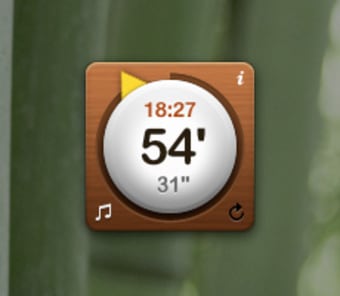
Minutes is a free utility application designed for Mac users, focusing on enhancing productivity through effective time management. This app allows users to track their tasks, manage schedules, and optimize their daily activities. With its user-friendly interface, Minutes simplifies the process of organizing tasks, ensuring that users can easily prioritize their work and stay on top of deadlines.

Top Recommended Alternative

The application offers features that include task tracking, reminders, and customizable scheduling options. These tools empower users to create a structured plan for their day, making it easier to balance work and personal commitments. Minutes stands out in the Utilities & Tools category by providing essential functionalities that cater to both individual and team productivity needs.

 0/2

App specs

  • License

    Free

  • Version

    2.0.1

  • Latest update

  • Platform

    Mac

    Other platforms (2)
  • OS

    Mac OS X

  • Language

    English

    Available languages

    • English
    • Japanese
  • Downloads

    27.1K

  • Size

    2.71 MB

  • Developer

Also available in other platforms

Program available in other languages


Icon of program: Minutes

Minutes for Mac

  • Free
  • 3.1
    44
  • 27.1K
  • V2.0.1
Free Download for Mac

View an ad to download for free


User reviews about Minutes

3.1

3 reviews

Add review

Main reviews for you

  • Anonymous user

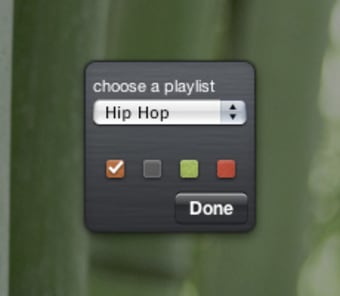
    Beautiful but limited.. This widget is very simple to use and looks beautiful and general. You can connect the widget with iTunes and make it play or stop playing when the timer runs out. In the beginning I was confused as how to use the widget, but it didn't take me very long to figure it out. The widget a couple of functions, but it feels a bit limited. You can set the time at whatever time you want, but when you have set it you can only chose between play or not to play. You can't pause it in the middle, unfortunately. Pros: - Looks very nice- Easy to use- Small and simple Cons: - Limited functions

  • Anonymous user

    Works nicely, but stops my itunes playlist. I want to be able to play music in itunes, set the timer, and have the timer interrupt the music, then resume the music. As it is, it seems to stop itunes entirely. Pros: Can pick a variety of sounds, including my own wavEasy to setRemembers most recently set time after the timer ends Cons: Stops itunes instead of interrupting it or playing over itA little tricky to pick my own wav file, there's no "open" dialog box

  • Anonymous user

    How about Minutes for iPod Touch?. Simple and effective. Easy to start; jangling alarms (that cannot be ignored!) and the most useful timer I have owned. Thanks.Any chance of making n iPod Touch equivalent?

More

You may also like

Alternatives to Minutes

Explore Apps

Latest articles

Laws concerning the use of this software vary from country to country. We do not encourage or condone the use of this program if it is in violation of these laws.
Softonic

Is Minutes safe?

100/100

Score result: Clean

This file passed a comprehensive security scan using VirusTotal technology. It is safe to download.

  • Virus free
  • Spyware free
  • Malware free
  • Verified by Security Partners

    VirusTotal logo

Scan Info

Last scan
Tuesday, April 23, 2024
Scan provider
VirusTotal · Full report

File Integrity

File
Minutes.zip
SHA256
fca8b6a44d6a2dafec7d771687c64f620a1bfdd19984dd0462a3bd0389d80e60
SHA1
ef8e80a4ca72fe06b162d454a64edbe2b5e93165

Softonic security commitment

Minutes has been thoroughly scanned by our advanced security systems and verified by industry-leading partners. This file comes from the official developer and has passed all our security checks, showing no signs of viruses, malware, or spyware. For more information, visit our Security and Trust Center